
How to Use Your Daikin Air Con Remote: A Complete Guide for Perth Homeowners
Just had a new Daikin split system installed? Once the unit is on the wall and ready to go, the remote is what helps you get the best out of it day to day.
The good news is that most Daikin remotes are fairly simple once you know what the main buttons do. This guide explains how to turn your system on, change modes, set the temperature, use timers, clean the filters and troubleshoot a remote that is not responding.
Button names and layouts can vary slightly between models, but the basics below apply to most wall-mounted Daikin split systems used in Perth homes.
Getting Started With Your Daikin Remote
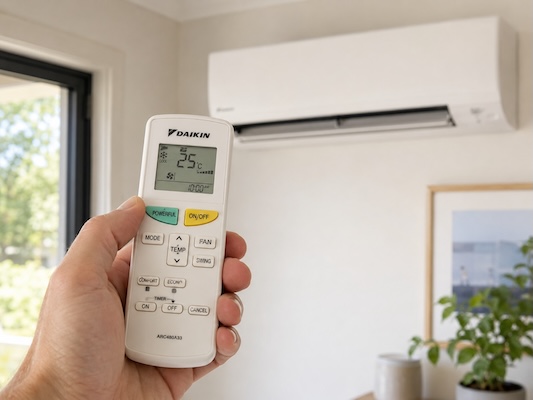
To use your Daikin remote, point it directly at the indoor wall unit. The signal needs a clear path, so avoid standing too far away or pointing it through furniture, curtains or other objects.
The three main controls most homeowners use are:
On/Off: Turns the indoor unit on or off.
Temp: Raises or lowers the set temperature.
Mode: Lets you switch between cooling, heating, dry and fan operation.
A simple starting point for Perth summer is to set the system to Cool mode and choose a comfortable temperature around 24°C. For winter heating, switch to Heat mode and adjust the temperature to suit the room.
The number on the remote is the temperature you want the room to reach. It is not the temperature of the air coming out of the unit. Setting it extremely low in summer will not usually cool the room instantly. It just makes the system work harder for longer.
Understanding Daikin Split System Modes
One of the most useful things to learn is how Daikin split system modes work. The mode you choose tells the system what job you want it to do.
Cool Mode
Cool mode is the setting you will use most during Perth’s warmer months. It cools the room to your selected temperature and is ideal for hot afternoons, warm bedrooms and open-plan living spaces.
For everyday comfort, try setting the temperature between 24°C and 26°C. This is usually cool enough for most homes without forcing the system to run harder than needed.
Heat Mode
Heat mode is used during cooler weather. A reverse cycle Daikin split system can warm a room quickly and is a practical option for cold Perth mornings and winter evenings.
Choose Heat mode, then set the temperature to a comfortable level. If the system does not blow warm air straight away, give it a few minutes. Some systems take a short time to prepare before heating properly.
Dry Mode
Dry mode helps reduce moisture in the air. It is not the same as full cooling, but it can make a room feel more comfortable when the air is humid.
This can be useful after rain, during muggy weather or in rooms that feel a little damp. It is best used when the temperature is not extremely hot, but the air feels heavy or sticky.
Fan Mode
Fan mode circulates air without actively cooling or heating the room. It is handy when the room temperature is already comfortable, but you want better airflow.
Fan mode generally uses less energy than cooling or heating because the system is not working to change the room temperature.
Extra Comfort Features: Powerful Mode and Quiet Mode
Many Daikin remotes include extra comfort settings. The names can vary by model, but two common features are Powerful Mode and Quiet Mode.
Powerful Mode gives the system a short boost when you want fast cooling or heating. For example, you might use it when you first get home on a hot Perth afternoon and the room has built up heat during the day.
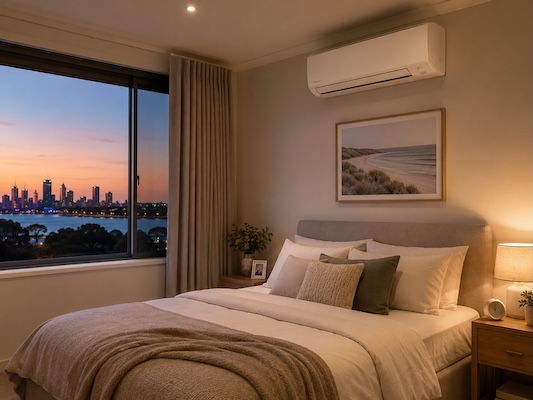
Quiet Mode reduces operating noise. This is useful for bedrooms, nurseries, home offices or evening use when you want the room comfortable without the system feeling too noticeable.
These features are best used when needed, rather than left on all the time. For normal everyday use, standard Cool or Heat mode with a sensible temperature setting is usually enough.
If you are still deciding on a system, the Daikin range stocked by Air-Cond Installs WA includes options suited to bedrooms, living areas and larger open-plan spaces across Perth homes.
How to Set the Clock and Daikin Timer
Setting the clock first helps your Daikin timer work properly. The exact button names may differ, but the process is usually similar.
How to Set the Clock
- Look for a Clock, Set Clock or small clock symbol on the remote.
- Press and hold the clock button until the time starts flashing.
- Use the up and down buttons to set the correct time.
- Press Set, Confirm or the clock button again to save it.
Once the clock is correct, you can use the Daikin timer to turn the system on or off automatically.
How to Set the On Timer
Use the On Timer when you want the air conditioner to start at a set time.
- Press On Timer or the timer button until the on timer symbol appears.
- Use the arrow buttons to choose the start time.
- Press Set or Confirm.
- Check that the timer symbol is showing on the screen.
This can be useful if you want a bedroom cooled before bedtime or a living area comfortable before you get home.
How to Set the Off Timer
Use the Off Timer when you want the system to stop automatically.
- Press Off Timer or cycle through the timer options.
- Choose the time you want the system to switch off.
- Press Set or Confirm.
- Make sure the off timer symbol appears on the display.
This is handy overnight if you do not want the system running until morning.
To cancel a timer, press Cancel, Timer Cancel or cycle through the timer settings until the timer symbol disappears.
Daikin Filter Cleaning and Maintenance
Regular filter cleaning helps your split system breathe properly. Dirty filters can reduce airflow, make the unit work harder and affect how well it cools or heats the room.
A simple home filter clean usually involves:
- Turning the air conditioner off.
- Opening the front panel of the indoor unit.
- Removing the filters carefully.
- Vacuuming dust from the filters.
- Rinsing them with lukewarm water if needed.
- Letting them dry fully in the shade.
- Reinstalling them before turning the system back on.
Never put wet filters back into the indoor unit. Make sure they are completely dry first.
Some Daikin models may show a filter alert or cleaning reminder. If the alert appears, clean the filters and follow your remote or manual instructions to clear the reminder. If the message does not reset, or you are unsure, check the manual for your exact model.
For most Perth homes, checking the filters every few months is a good habit. If you use the system heavily, have pets, live near dust or run it daily through summer, you may need to clean them more often.
What to Do if Your Daikin Remote Is Not Working
If your Daikin remote is not responding, try these quick steps before assuming there is a fault.
First, replace the batteries. Make sure they are inserted the right way around, following the plus and minus symbols inside the battery compartment.
Next, point the remote directly at the indoor unit and stand closer to it. If the unit responds from close range but not from across the room, the batteries may still be weak or something may be blocking the signal.
Check the remote screen. If the display is blank or faded, the batteries are usually the first thing to rule out.
Some Daikin remotes also have a small reset button, often labelled Reset or ACL. You may need to press it gently with the tip of a pen. After resetting, you may need to set the clock again.
If the indoor unit still does not respond, turn the system off at the controller, then at the isolator if it is safe and accessible to do so. Wait a few minutes before turning it back on. Do not open electrical panels or attempt internal repairs yourself.
If the issue continues, contact your installer or Daikin support for advice.
Need Help With a Daikin Split System in Perth?
Learning how to use your Daikin remote makes day-to-day comfort much easier. Once you understand the main buttons, modes, timer and filter care, your split system becomes simple to manage through Perth’s hot summers and cooler winter nights.
If you are planning a new installation, it is worth understanding your split system installation options before getting started. Air-Cond Installs WA installs across Perth and can help match the right unit to your space and budget.
As a Daikin Specialist Dealer, Air-Cond Installs WA supplies and installs Daikin split systems across Perth, with practical advice from experienced local installers.
For help choosing the right system or organising an installation, contact Air-Cond Installs WA for a quote.